
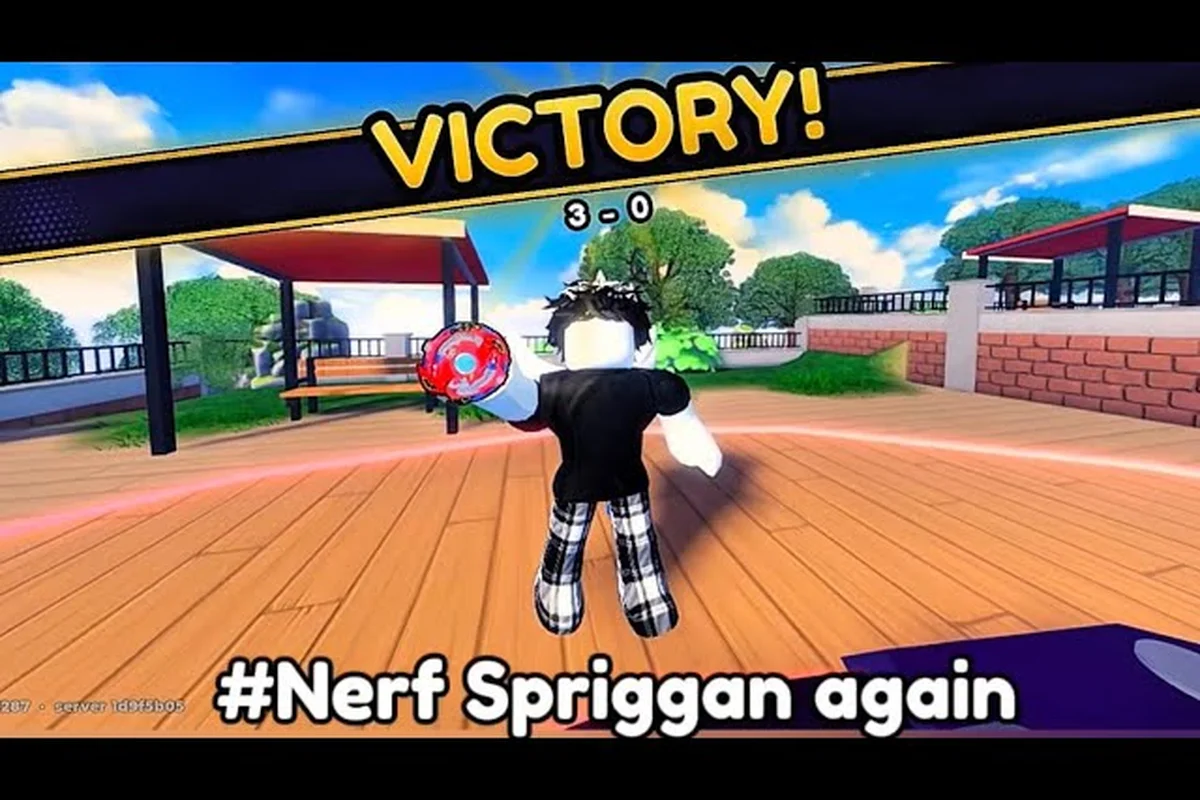
Bey Rivals secrets rarely live in hidden menus. They live in how you read the controls, the UI, and the part economy before your first ranked match. Start with Bey Rivals PC controls: mouse aim governs launch angle, while the spacebar charges spin power — releasing late trades raw RPM for a steeper, harder-to-counter trajectory. The Bey Rivals UI explained layer matters just as much: the stamina ring drains in real time, so track it against your opponent's rather than your own health bar. Finally, budget your part economy early — a single Attack-type tip upgrade costs roughly the same as two Stamina chips, and spending both on offense leaves you exposed in longer sets. This guide turns those small decisions into wins.
Reading the Bey Rivals Controls Before Your First Launch
Most new bladers lose their opening matches to input confusion, not to weak parts. The game runs inside the Roblox client, so your movement, camera, and launch inputs all follow Roblox conventions rather than a bespoke control scheme. That single fact explains why so many players search for Bey Rivals controls and then feel lost — they expect a custom button map that simply does not exist.
The tutorial is your real control manual. It walks you through launching a Bey, watching the clash resolve, and reaching the Shop for the first time. There is no official in-game written manual, so the tutorial, tooltips, and community guides carry the entire teaching load. Treat the tutorial as a checklist rather than a cutscene.
A few control realities worth internalizing early: your Bey Rivals controls are effectively Roblox defaults, so W-A-S-D handles arena movement, the mouse drives camera orbit, and the launch itself is a single timed click rather than a combo string. That means Bey Rivals PC controls carry no hidden burst macro — the spin-and-hit loop is timing, not button mashing. The Bey Rivals UI reinforces this: stamina bars and ring-out zones sit on the HUD, so reading them mid-clash beats reacting to your hands.
-
Launch timing matters more than launch speed — community beginner videos stress timing and stamina management before spending Lucky Spins.
-
Camera control is your tracking tool; keeping the arena centered helps you read ring-out risk.
-
Movement inputs decide your positioning, while the clash outcome is decided by burst or knockout.
-
Remapping lives in Roblox settings, not in a game file, so adjust there if the defaults feel awkward.
According to community data, the fastest way to build muscle memory is repeatable NPC arena matches, where you can practice the spin-and-hit loop without ranked pressure. Once launching feels automatic, you can focus on the actual matchup instead of your hands.
Why Launch Timing Beats Button Mashing
A Bey that burst-pops or gets knocked out of the ring loses the clash, so the goal is never "hit harder" — it is "stay spinning longer than the other Bey." Launch timing feeds directly into that outcome because a clean launch preserves stamina, while a sloppy one bleeds it. Players who mash inputs tend to overcommit early and then watch their Bey fade in the final seconds.
The practical takeaway: run a handful of low-stakes NPC battles and deliberately vary your launch timing until you can predict how long your Bey survives. That feedback loop teaches more than any written explanation, and it costs nothing but a few minutes.
The Roblox Client Layer You Should Not Ignore
Because everything runs through the Roblox client, your platform settings quietly shape the experience. Frame rate, camera sensitivity, and input responsiveness all come from Roblox rather than from BBR Productions. If the game feels sluggish, the fix usually sits one layer up.
This is also why Bey Rivals PC controls and mobile controls differ in feel but not in rules. The clash logic is identical; only the input surface changes. Understanding that separation stops you from hunting for settings that do not exist inside the game itself.
Bey Rivals PC Controls and Mobile Input Compared
The most common misconception about Bey Rivals PC controls is that the PC version unlocks extra abilities. It does not. Both platforms feed the same arena rules, and the difference is purely ergonomic. What changes is how precisely you can aim a launch and how quickly you can react to a wobbling Bey.
The table below summarizes how the same actions map across platforms, based on how the Roblox client handles input and what the tutorial exposes. Note that every row resolves to identical in-arena outcomes: the launch input is a click on PC versus a tap on mobile, yet both register against the same timing window, so a mistimed release fails on either device. The only genuine hardware-driven gaps are camera control (mouse look versus touch drag) and remapping, which lives in Roblox settings rather than any Bey Rivals game file.
| Action | PC (Roblox client) | Mobile (Roblox client) | Notes |
|---|---|---|---|
| Move / position | Keyboard movement keys | On-screen joystick | Same in-arena effect |
| Camera | Mouse look | Touch drag | PC allows finer tracking |
| Launch | Click / key input | Tap input | Timing matters more than device |
| Shop access | Menu click | Menu tap | Unlocked by tutorial |
| Code redemption | Shop → Codes tab | Shop → Codes tab | Same path on both |
| Remapping | Roblox settings | Roblox settings | Not a game-file change |
The practical edge on PC is camera precision. Being able to keep the arena framed while your Bey drifts gives you a clearer read on ring-out danger. On mobile, the joystick occupies screen space, so players often develop a looser but faster style. Neither is strictly better — the meta rewards whoever reads the clash first.
If you want a deeper walkthrough of menus and modes, the unlock guide for modes, menus, and controls breaks down what opens up as you progress. It pairs well with this section because it covers the same menu surfaces from a progression angle.
Setting Up Comfortable PC Input
Start by opening Roblox settings and checking camera sensitivity. A slightly lower sensitivity makes it easier to track a fast-moving Bey without overshooting. Then confirm your movement keys feel natural for small positional adjustments, since arena positioning is about inches, not sprints.
Once those two are dialed in, run a few NPC matches to confirm the feel — pick a lightweight Bey like a stock Valtryek build so your launch timing reads clearly against a predictable opponent. If your launch still feels late, the issue is timing rather than hardware: the Bey Rivals launch meter rewards releasing at the top of the charge arc, and more practice — not a settings change — is the fix.
Bey Rivals UI Explained: Menus That Actually Matter
The Bey Rivals UI explained in one sentence: almost everything you need lives behind the Shop and the arena entry, and the tutorial is what unlocks them. There is no sprawling interface to memorize. New players who feel overwhelmed are usually looking for depth that the early game does not yet have.
Here is how the core surfaces break down, based on what the tutorial and menu are known to expose. The tutorial prompt chain is the gatekeeper: it walks you through launch timing, the clash input, and the first Shop unlock, so skipping or rushing it leaves the Shop, Codes tab, and Banner spin locked behind a wall you cannot buy your way past. Once unlocked, the Shop becomes the single hub for three separate systems — banner rolls, code redemption, and the BP economy — which is why the UI separates Spin Tickets, Lucky Spins, and Soul Tickets into distinct counters instead of one generic currency. Each tab maps to a different spend decision, so checking the label before tapping spin is the difference between a targeted banner pull and a wasted Lucky Spin.
| UI Surface | What It Does | When You Use It |
|---|---|---|
| Tutorial prompts | Teaches launch, clash, and Shop access | First session only |
| Shop menu | Central hub for spins and codes | After tutorial unlock |
| Codes tab | Redeem active codes inside the Shop | Whenever codes drop |
| Banner spin | Rolls parts from the current banner | When you have Spin Tickets |
| Arena entry | Starts NPC or PvP clashes | Every battle session |
| Rank display | Tracks ladder progress | Between matches |
The Codes tab deserves special attention. Redeeming codes happens inside the game — open the Shop, go to the Codes tab, and enter the code there. Codes expire or change after updates, and joining the official BBR Productions group is required before most codes will redeem. That group requirement trips up a lot of new players who assume a code is dead when it is actually just gated.
Bey Points (BP) are the main currency, while Spin Tickets, Lucky Spins, and Soul Tickets feed the part-rolling economy. The UI keeps these separate, which is why reading each tab before spending saves you from wasting a Lucky Spin on a banner you did not intend to roll.
The Codes Tab Workflow
The sequence is short but order-dependent: join the group, launch the game, open the Shop, switch to the Codes tab, and redeem. Skipping the group step is the single most common reason a valid code appears to fail. As of 2026-10-26, codes remain time-sensitive and rotate with updates, so redeem them the day you find them rather than stockpiling.
Banner Spins and the Part Economy
Banner spins are how you acquire parts, and parts are how you change your Bey's identity. The community recommends spending starter Bey Points on a first banner spin and keeping early parts that fit a Balance or Stamina build. That advice exists because early parts are cheap to replace but expensive to regret — a scattered collection slows your first real build.
Building a Bey That Survives the Clash
Part types fall into Attack, Defense, Stamina, and Balance, and surnames plus traits layer throw-type modifiers and stat buffs on top. That is the whole build vocabulary, and it is enough to make meaningful choices. The trap is chasing raw offense before you can reliably keep a Bey spinning.
The table below frames the trade-offs in decision terms rather than invented numbers, since BBR Productions has not published exact stat values. Treat each row as a launch-timing and stamina-budget profile: an Attack build leans on early clash pressure before its spin meter drains, a Defense build trades knockout resistance for slower finishes, and a Stamina build wins by outlasting rather than out-hitting. Because part surnames and traits shift these numbers further, the honest takeaway is directional, not decimal — pick the row that matches your launch consistency, then let your parts confirm it.
| Build Direction | Strength | Weakness | Best For |
|---|---|---|---|
| Attack | Aggressive clash pressure | Burns stamina fast | Players with clean launch timing |
| Defense | Absorbs hits, resists knockouts | Slower to close out | Learning matchups safely |
| Stamina | Outlasts opponents | Low burst damage | Patient, timing-focused play |
| Balance | Flexible across matchups | Master of none | First serious build |
Community sources describe leveling through battles and part upgrades without a verified cap, so treat progression as open-ended. What matters early is consistency: pick one direction, gather parts that support it, and stop rerolling the moment your build functions.
Understanding what each part actually contributes makes this far easier, and the breakdown of part colors, traits, and stats explains how surnames and traits modify a loadout. Reading it before your next banner spin usually changes which parts you keep.
Surnames, Traits, and Throw Modifiers
Surnames and traits are the layer most players ignore until they hit a wall. They add stat buffs and throw-type modifiers that can shift a matchup without changing your part types at all. Because the game launched in the October 2026 window and patches frequently, the meta shifts quickly — a surname that felt marginal last week can matter after a balance pass.
The safe approach is to keep parts that fit your chosen direction and revisit traits once your core build is stable. Chasing every modifier early spreads your collection thin, since each throw modifier only triggers on its matching throw type — a Slash buff does nothing for a Stamina-heavy bey, and a surname reroll costs resources you could sink into a second Blade layer instead. A practical rule: lock in two compatible traits that reinforce your existing part synergy (for example, a Defense surname paired with a Stamina modifier), run ten ranked matches to confirm the stat buffs actually surface, then expand only when your win rate plateaus. Because balance passes can quietly retune a modifier's scaling, treat any trait tier list as a snapshot rather than a permanent build target.
When to Stop Rolling and Start Battling
There is a point where more spins stop helping and more matches start helping. That point arrives when your Bey reliably survives to the late clash. Once it does, arena time teaches matchups that no banner can. Community beginner videos consistently push players toward NPC battles before ranked for exactly this reason.
Secrets That Separate New Bladers From Ranked Regulars
The real Bey Rivals secrets are habits, not exploits. They are the small routines that experienced bladers run without thinking, and they compound faster than any single part upgrade. The first habit is the launch angle check: before every match, veteran bladers rotate their launcher 15–20° toward their own dominant hand, which stabilizes the initial spin axis and reduces wobble during the first two seconds of contact. The second is the stamina buffer rule — never enter a ranked match with a Bey whose stamina stat is below 70% of its max, because the matchmaking algorithm in Bey Rivals pairs you against opponents within a 5% power band, and a depleted stamina gauge drops you into a lower band where defensive builds dominate. The third habit is part-swap discipline: experienced players keep three pre-built combos saved in their loadout slots (one attack, one defense, one stamina) and swap only between matches, never mid-tournament, since the game locks part changes during active brackets. None of these are hidden mechanics — they are simply routines that new players skip because the tutorial never explains them, and that is exactly why they feel like secrets.
A practical early-game routine, drawn from community guidance: the launch angle check should be drilled first, since rotating your launcher 15–20° toward your dominant hand stabilizes the spin axis before the first clash — this pairs directly with the bey rivals controls layout, where the launch input is mapped to a single button and the angle is set entirely by wrist position, not stick input. Once launching feels automatic, layer in the stamina buffer rule (never queue ranked below 70% stamina) and part-swap discipline (three saved loadouts, swaps only between matches). Treat these as a checklist rather than tips: each one removes a specific early mistake — wasted Spin Tickets, scattered Bey Points, and ranked losses against defensive builds — so your first week builds habits instead of bad muscle memory.
- Join the BBR Productions group before redeeming anything.
- Complete the tutorial to unlock the Shop and your first Spin Tickets.
- Redeem active starter codes the day you find them.
- Spend starter Bey Points on one banner spin, not several.
- Keep early parts that fit a Balance or Stamina direction.
- Run NPC arena battles until launching feels automatic.
- Enter ranked only after your Bey survives the late clash.
Each step removes a future mistake. Joining the BBR Productions group before redeeming anything prevents the code frustration that hits players who burn starter codes on a guest account and lose the Spin Tickets permanently. Completing the tutorial unlocks the Shop, so your first banner spin actually registers against your real Bey Points balance instead of a locked placeholder. Spending starter Bey Points on one banner spin — not several — prevents a scattered collection that can't field a single Balance or Stamina combo. Running NPC arena battles until launching feels automatic prevents ranked losses that teach nothing, since a dropped launch angle costs you the first clash and the match before you learn anything.
Progress is measured through rank, Bey level, part quality, and collection size, and no official numeric thresholds are published, so compare yourself to your own last session rather than to a leaderboard. That mindset keeps the early grind productive instead of discouraging.
Follow the Meta Without Overcommitting
Because balance patches arrive frequently, the meta is a moving target. The efficient response is to build a Bey that functions under multiple conditions rather than one that exploits a single strong interaction. Stamina and Balance builds tend to survive patch swings better than narrow Attack setups, which is why community guides steer beginners toward them.
Treat the first post-patch session as a scouting run, not a ranked climb. Load the same three-to-four part combination you ran before the update and take it into NPC battles or a low-stakes lobby, watching for the specific tells that a patch broke something: a Stamina-type that now bursts early instead of outlasting, a Defense ring whose recoil no longer redirects, or a Balance build whose spin-steal timing drifts a beat late. Because Bey Rivals resolves most outcomes through the launch, contact, and burst-finish phases, a single nerfed stat line — say a Stamina drain tweak or a reduced Attack multiplier — cascades through the whole match, so a build that "feels fine" in the garage can still collapse once the Bey Rivals controls put it under real contact pressure. Run two or three NPC matches, note which phase your combo loses ground in, then swap only the part responsible rather than rebuilding from scratch. That ten-minute diagnostic saves you the ranked points you would otherwise donate to players who already re-tested their setups.
Turning Practice Into Ranked Confidence
Ranked pressure changes how people launch. The fix is repetition under low stakes first, then a gradual move into PvP once the launch is automatic. If you want the full picture of how clashes resolve and what wins them, the guide to launches, burst, and winning battles covers the arena side in detail and complements the control habits above.
The through-line is simple: control comfort enables build decisions, and build decisions enable ranked progress. Skip a step and the later ones get harder. Concretely, if your dash and guard inputs aren't automatic, you'll burn your burst window reacting to your opponent instead of reading their launch angle, and a mistimed counter leaves your stamina drained for the next exchange. The same logic applies whether you're on keyboard or a controller layout — the Bey Rivals PC controls breakdown shows how remapping guard and dash to adjacent keys shortens that reaction gap. Once inputs are muscle memory, you can commit to combo parts and spin-steal timing without second-guessing your hands, which is exactly what ranked lobbies punish you for.
Frequently Asked Questions
Are there hidden Bey Rivals secrets in the game menus?
No. There is no official in-game written manual and no hidden menu layer. The tutorial, tooltips, and community guides carry the teaching load, and the Shop plus Codes tab are the main surfaces worth learning. Most "secrets" are really habits around launch timing, part choices, and code redemption.
How do Bey Rivals PC controls differ from mobile?
They do not differ in rules, only in feel. Both platforms run through the Roblox client, so clash logic is identical. PC allows finer camera tracking with mouse look, while mobile uses a touch joystick. Remapping lives in Roblox settings on both platforms, not in a game file.
Do I need to join the BBR Productions group to redeem codes?
Yes. Joining the official BBR Productions group is required before most in-game codes will redeem. Redeeming happens inside the game through the Shop menu and its Codes tab. Skipping the group step is the most common reason a valid code appears to fail, so join first.
What should I spend my first Bey Points on?
Community guidance recommends spending starter Bey Points on a single banner spin and keeping early parts that fit a Balance or Stamina build. Spreading spins across multiple banners early scatters your collection and slows your first functional build. One focused spin beats several unfocused ones.
Is there a max level or verified stat cap?
BBR Productions has not published a max level or numeric stat thresholds. Community sources describe leveling through battles and part upgrades without a verified cap. Treat progression as open-ended and compare your Bey to your own previous session rather than to published numbers that do not exist.